
1723534562.png)

NID Application Form 2027 (OUT Now): Last Date 30 November, Fees, Documents & How to Apply
September 11, 2026
The NID Application Form 2027 is live now at the official website, admissions.nid.edu. The National Institute of Design (NID) opened online registration on 10 September 2026 for its B.Des, 5.5-Year Integrated M.Des Program (newly-launched), and 2.5-year M.Des programs, admitted through the NID DAT (Design Aptitude Test).
The last date to complete NID registration 2027 is 30 November 2026 (11:59 pm), and the NID DAT Prelims exam will be held on Sunday, 20 December 2026.
To apply, candidates sign up at admissions.nid.edu, fill in personal and educational details, upload a photograph, signature, and any category certificates, and pay the application fee online. The NID application fee is ₹3,000 for General, GEN-EWS, and OBC-NCL candidates, with concessions for female (₹2,000), SC/ST (₹1,500), and PwD/Third Gender (₹500) applicants.
The form is online only - NID does not accept offline applications.
Key Highlights- NID 2027 Application Form
|
Particular |
Details (2027-28, Confirmed) |
|
Exam |
NID DAT (Design Aptitude Test) |
|
Programs |
B.Des / 5.5-Yr Integrated M.Des - Integrated Pathway / 2.5-Yr M.Des |
|
Application mode |
Online only - admissions.nid.edu |
|
Form release |
10 September 2026 (OUT now) |
|
Last date to apply |
30 November 2026 (11:59 pm) |
|
Edit window |
1 December (4 pm) - 3 December 2026 (11:59 pm) |
|
Prelims admit card |
10 December 2026 (4 pm) |
|
DAT Prelims exam |
Sunday, 20 December 2026 |
|
Prelims result |
B.Des/Integrated- 16 March 2027 | M.Des- 16 February 2027 |
|
Application fee |
₹3,000 (Gen/EWS/OBC-NCL) | ₹2,000 (female, non-reserved) | ₹1,500 (SC/ST) | ₹500 (PwD/Third Gender) | US$125 (Overseas) |
|
Exam stages |
DAT Prelims → DAT Mains (Studio + Interview/Sensitivity) |
NID registration 2027 is not that difficult, but your candidature might get rejected for even small, fixable errors like a name that doesn't match with your Class 10 certificate. This guide walks you through every small detail of the process, so you have complete clarity of dos and don’ts before you try to fill it.
Read the post to understand how to apply for the NID entrance exam 2027 and get complete guidance on required documents, application fees, and more.
Table of Contents
- What is NID Application Form 2027
- NID 2027 Application Form - Important Dates
- How to Edit NID Form 2027?
- Step-by-Step Process to Fill NID 2027 Registration Form
- NID Form Fees
- NID DAT Exam Cities You Can Choose in the Application Form
- NID 2027 Application Form: Final Checklist
- Common Mistakes to Avoid While Filling NID 2027 Registration Form
- NID Eligibility Criteria 2027
What is NID Application Form 2027
The NID application form is the online registration form that candidates are required to fill to apply for the National Institute of Design (NID) entrance exam.
It requires applicants to provide personal details, academic qualifications, category information, preferred exam centre, and upload the necessary documents, such as a photograph, signature, category proof, and supporting certificates.
The application process is completed only after paying the required application fee within the specified deadline.
NID does not accept offline applications, candidates must submit the form through the official NID admissions portal and carefully verify all details before final submission.
New in 2027- The 5.5-Year Integrated Pathway
For the 2027-28 cycle, NID has introduced a 5.5-Year Professional Education Master of Design (Integrated Pathway) - an eleven-semester program you can join straight after Class 12, that leads to a Master of Design.
It's offered at NID Ahmedabad, Bengaluru, and Gandhinagar across 15 disciplines grouped into five design streams- Industrial Design, Communication Design, Spatial Experience Design, Textile & Apparel Design, and Digital Design Futures (each discipline has an intake of 9). These campuses will also have M.Des program.
Separately, NID Andhra Pradesh, Assam, Haryana, and Madhya Pradesh offer a 5.5-Year Integrated M.Des / 4-Year B.Des. All of these are applied for through the same NID DAT application after 10+2.
Important: If you apply for B.Des / the Integrated Pathway after Class 12, you cannot also apply for the independent 2.5-year M.Des - both entrance exams run on the same day (20 December 2026). Choose one track.
NID 2027 Application Form Dates
Check out the table below to know all the important events related to the NID DAT 2027 entrance exam:
|
Events |
Dates (Confirmed) |
|
Application form release |
10 September 2026 |
|
Last date to apply (with fee) |
30 November 2026, 11:59 pm |
|
Window to edit application form |
1 Dec (4 pm) - 3 Dec 2026 (11:59 pm) |
|
DAT Prelims admit card |
10 December 2026, 4 pm |
|
DAT Prelims exam |
Sunday, 20 December 2026 |
|
DAT Prelims result |
B.Des/Integrated - 16 Mar 2027 | M.Des - 16 Feb 2027 |
|
Category-certificate edit window |
M.Des - 15-31 Jan 2027 | B.Des/Integrated - 16-28 Feb 2027 |
While completing your application on time is important, don't forget to test your prep with NID Mock Test Series before the real exam. These are free exam-like full-length mock papers created by Creative Edge experts. You also get instant performance analysis right after completing the test.
How to Edit NID Application Form 2027?
The National Institute of Design provides an opportunity to edit the NID Online Registration Form.
After this period, you can not change any detail in the NID registration form. Also, note that you can only make changes in specific fields.
As per the 2027-28 handbook:
- Candidates can change both their category and gender during the edit window.
- If the new category or gender attracts a higher application fee, the difference must be paid online.
- No refund will be issued if the change leads to a lower fee.
- No requests for change in category or gender (after the “Window to Edit the Application Form” closes) will be permitted during the subsequent stages of the NID admissions process.
- On verification, even after admissions, if the information/document/ category certificate are found to be incorrect / invalid, the candidature of such candidate will stand cancelled.
|
Editable Fields |
Non-Editable Fields |
|
Candidate’s category (General, OBC-NCL, EWS, SC, ST, PwD) |
Program Applied In |
|
Gender (change allowed in 2027 as per amendment) |
Name of the Candidate |
|
Educational qualifications |
Date of Birth |
|
Communication address |
Registered Mobile Number |
|
Test centre preference |
Email ID used in NID 2027 registration |
|
Upload of new/updated certificates or documents |
- |
|
Photograph/Signature (if incorrectly uploaded) |
- |
Note that:
Candidates must complete all steps (including payment and re-submission) before the deadline, or the changes will not be saved. Once saved, candidates should print the revised application form as confirmation of successful update.
How to Edit NID Application Form 2027?
You can follow the steps mentioned below to edit the NID application form 2027:
|
Steps |
Action |
|
Step - 1 |
Visit admissions.nid.edu |
|
Step - 2 |
Log in using your NID 2027 registration number and password |
|
Step - 3 |
Click on the ‘Edit NID Application Form’ option |
|
Step - 4 |
Make necessary corrections in allowed fields |
|
Step - 5 |
Review your form carefully and ensure all updates are correct |
|
Step - 6 |
Pay additional fees (if applicable) and proceed to the final submission |
|
Step - 7 |
Download and print the revised application form for future reference |
How to Retrieve Password for the NID DAT Application Form 2027?
If you forget your password while filling out the NID 2027 application form, follow the simple steps mentioned below.
- Visit the official website.
- Click on "Forgot Password". Then → auto-generated password sent to the registered email.
- If you forget the password, click "Forgot Enrolment ID or Password?"
- Click on "Request for an OTP".
- Provide a mobile number, email ID, and enrolment ID.
- You can reset the password with the help of OTP received via SMS.


Step-by-Step Process on How to Fill NID Application Form 2027
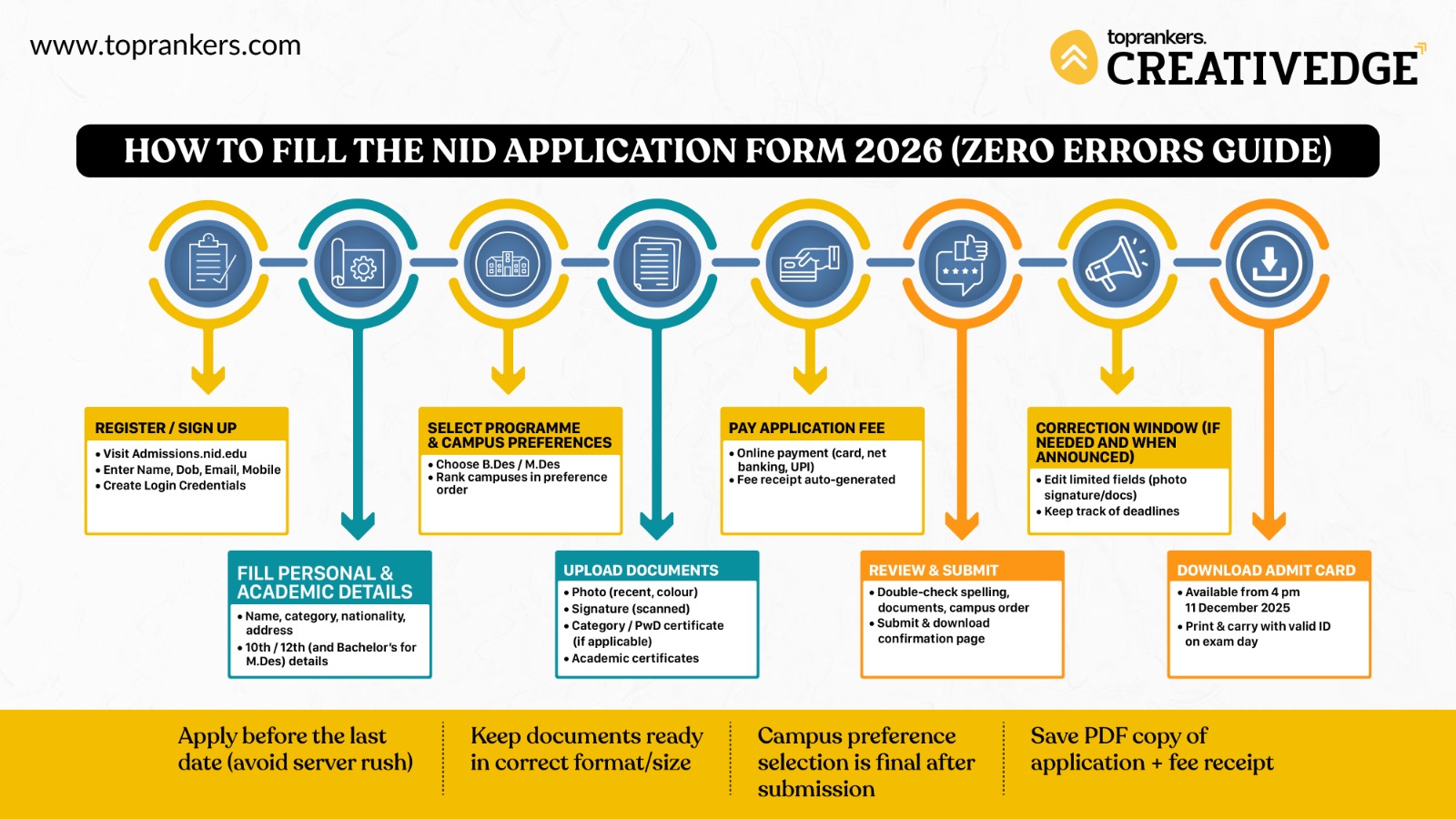
Want to understand how to register for the NID entrance exam through official website? Follow these instructions to fill your NID application form 2027 correctly:
Step 1: Signup
1. Go to admissions.nid.edu. Confirm that URL is correct (look for “admissions.nid.edu” with nid.edu domain).
2. In the 'Important Updates' section, you'll see- "Admissions for B.Des. & M.Des. is now OPEN."
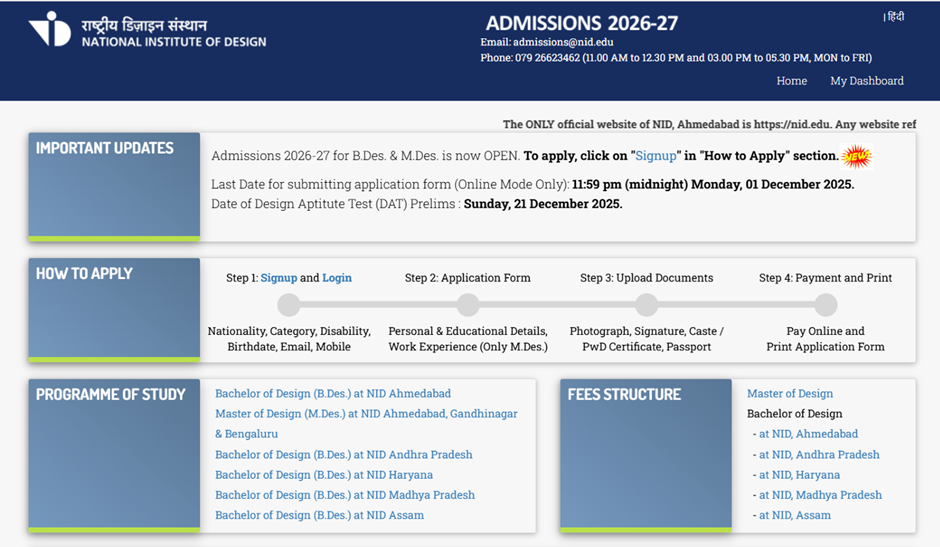
3. Click “Signup” under the “How to Apply” section.
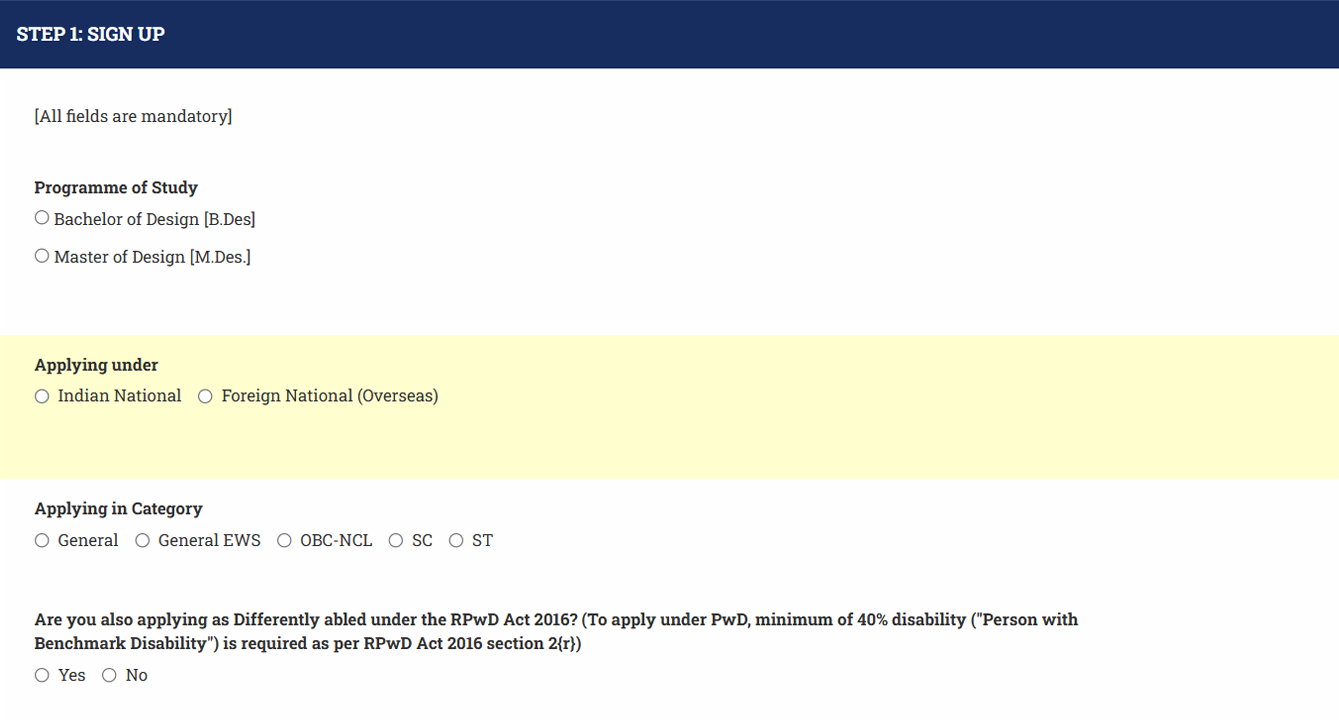
4. Enter:
- Full Name (exactly as per your 10th/12th certificate)
- Date of Birth (format: as required; double check digits)
- Email address (valid, one you check often)
- Mobile number
- Choose a secure password

5. Submit, and then verify your email (you’ll receive a link) or OTP on mobile or registered email id.
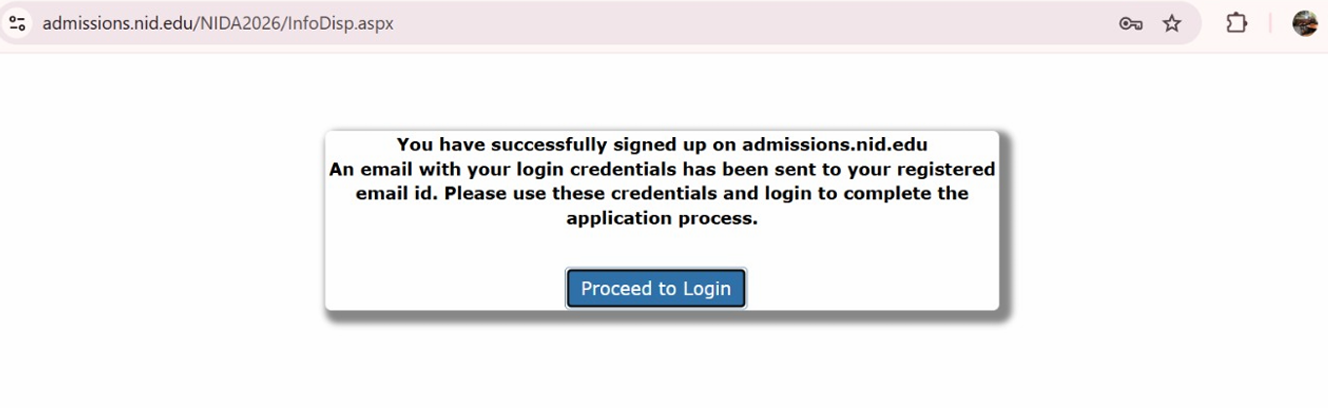
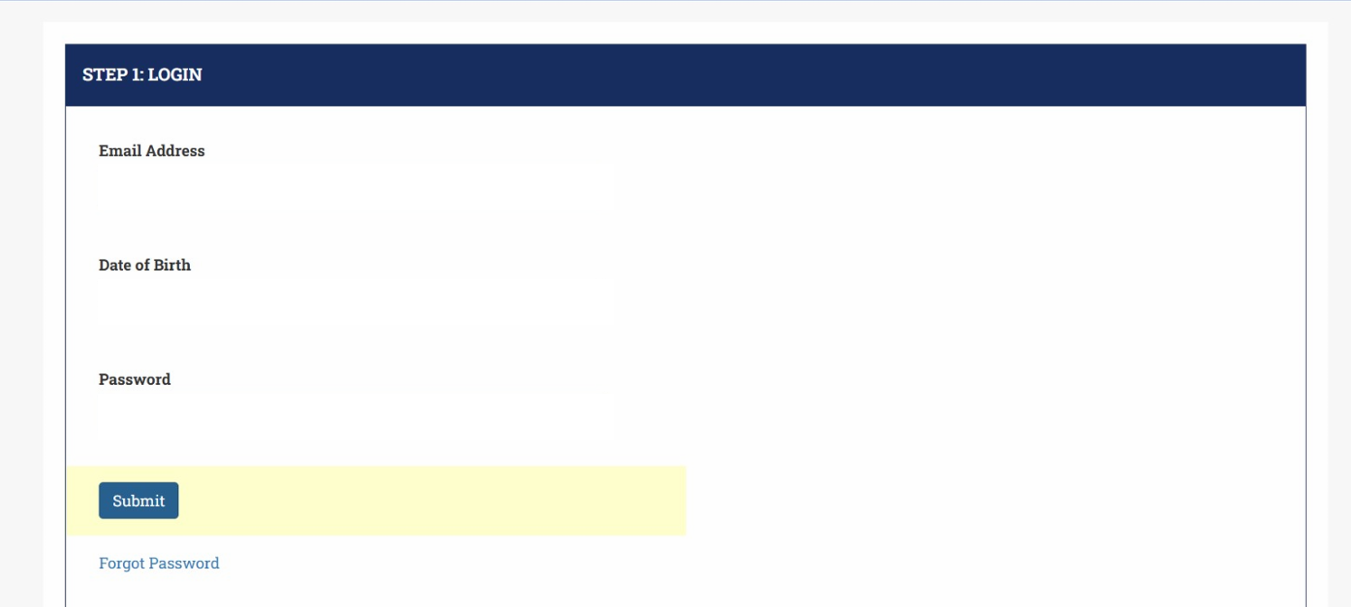
6. After verification, login with your credentials. Do not use temporary/transitional email; once registered, NID DAT 2027 registration details like name/date of birth may not be editable.
Common Errors in this Step & How to Avoid:
- Mistyping name or DOB (causes mismatch with official documents).
- Using block letters or different spellings (e.g., “Aqib” vs “Akib”) - be consistent with official records.
- Setting weak password, losing access to registered email or mobile.
Step 2: Fill in the Application Form - Personal & Educational Details
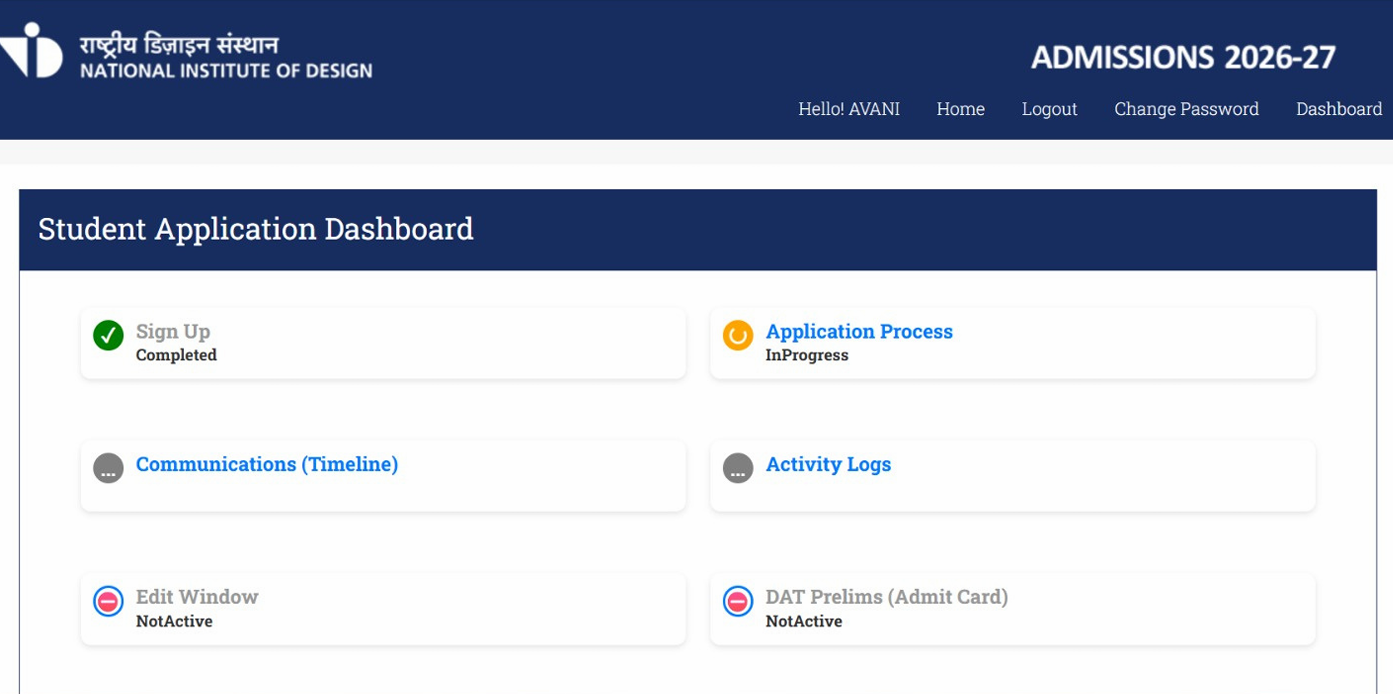
1. After login, you will see the student application dashboard in the application form. NID DAT 2027 registration details on it includes:
- Personal Details
- Name, DOB, Gender
- Nationality
- Category (General / SC / ST / OBC-NCL / EWS)
- PwD (Yes/No)
- Contact Address (permanent / correspondence)
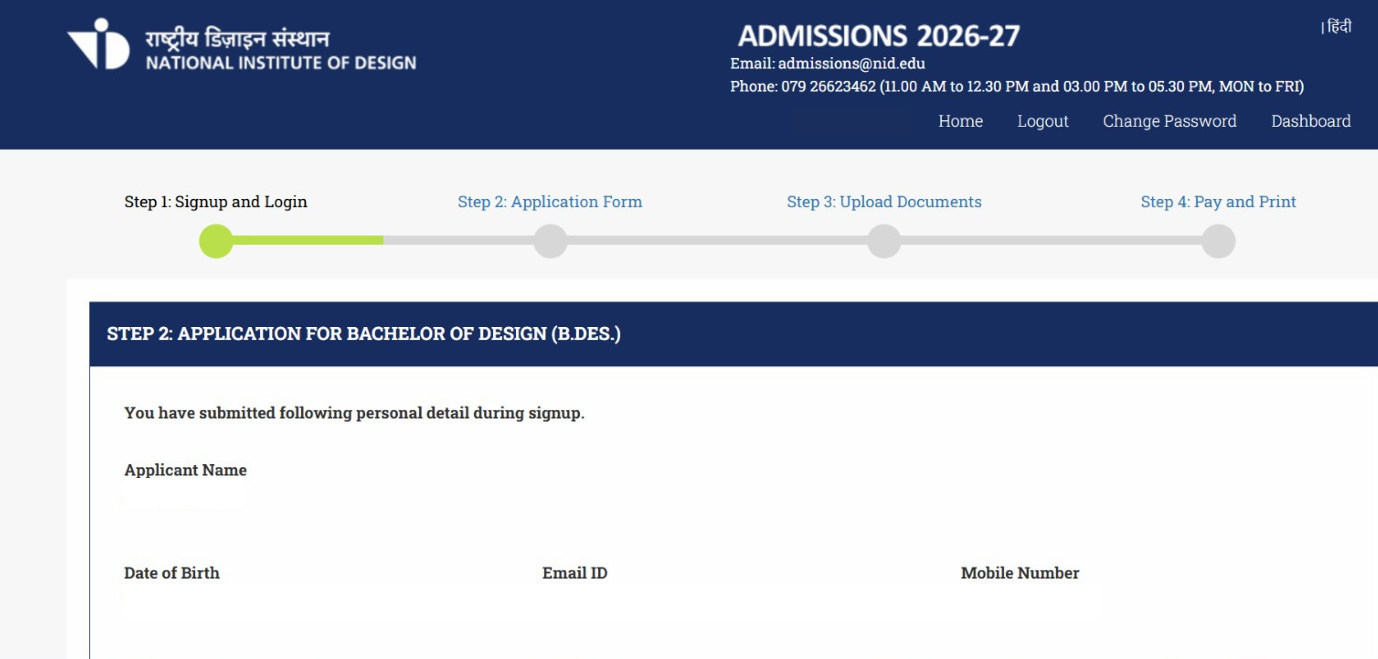

2. Educational Details:
- School / Board of 10th, Year of Passing, Marks obtained
- School / Board of 12th, Year, Marks
- For PG applicants: Bachelor’s degree details (institution, year, marks)

3. If appearing in the qualifying exam, enter ‘Appearing’ in exam status. If passed the qualifying exam already, enter ‘passed’.
4. Course / Program Selection
- Choose B.Des or M.Des as applicable.
- For M.Des, sometimes select one or two disciplines.
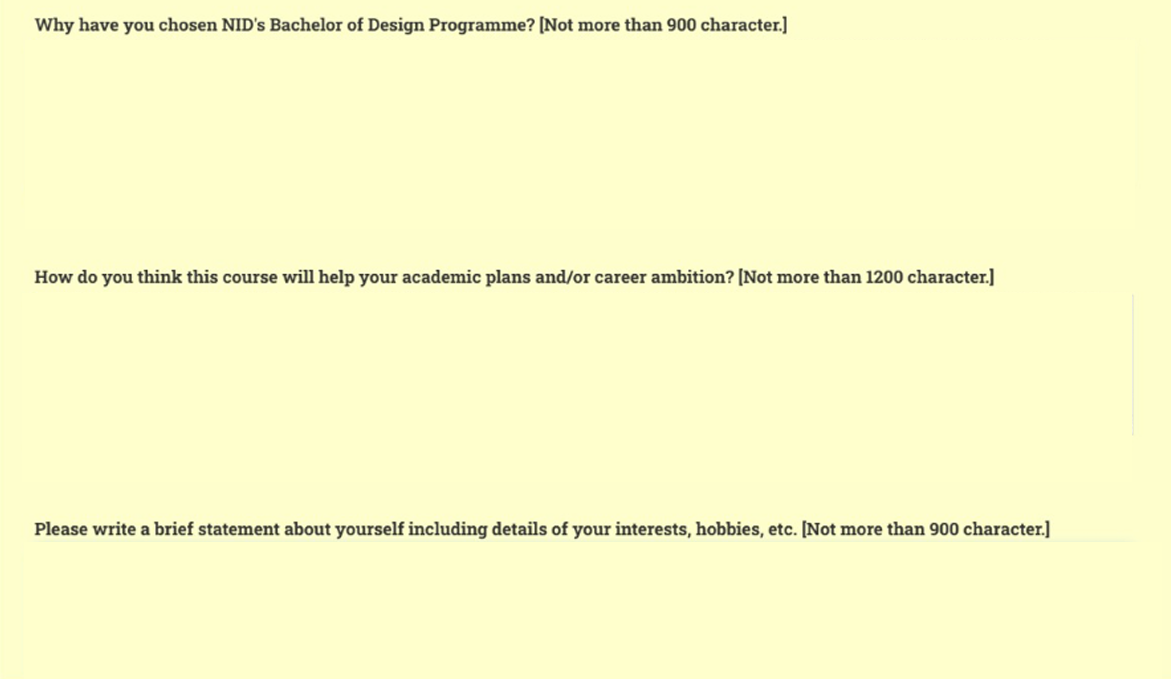
5. From this year, you’ll also be required to required to submit quick write ups about your interest in NID.
Mistakes to avoid in this step:
- Wrong board names / abbreviations (use the exact name as on certificate).
- Entering percentage marks vs CGPA wrongly (if the form asks one). Convert correctly if needed.
- Selecting wrong program or discipline (once submitted, changing may not be possible).
Step-3: Campus Preference Selection
The application form will ask you to indicate campus preference(s). This is usually an ordered list where you rank the campuses by priority based on the program you are applying for (B.Des or M.Des). You'll be required to fill 5 preferences in order of your choice.
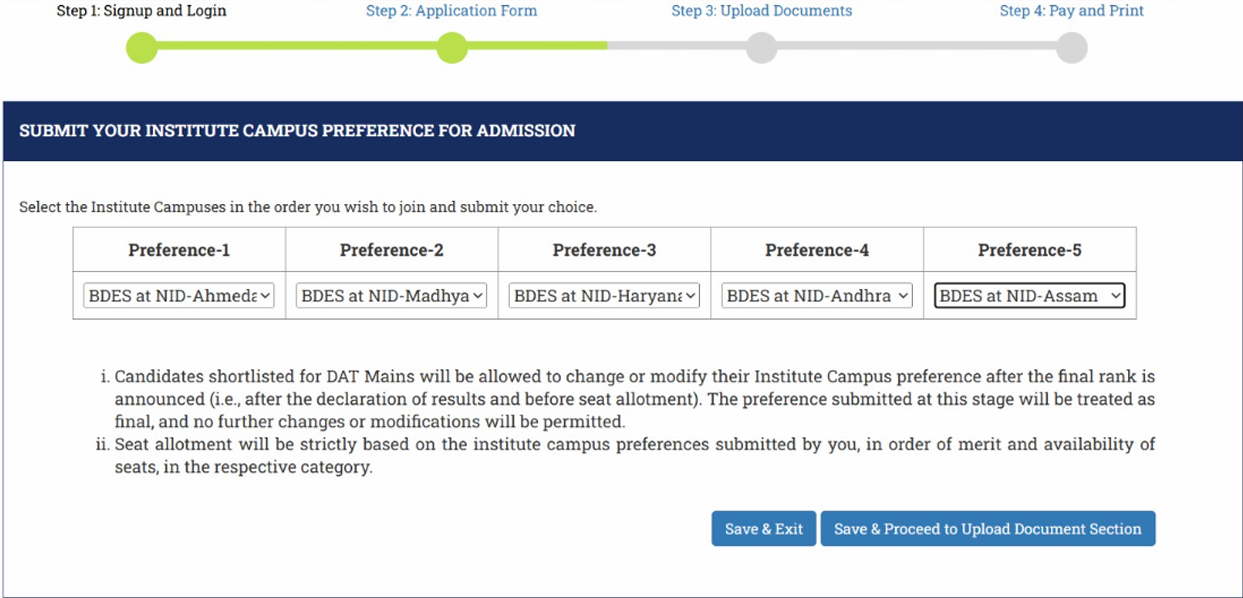
NID Campuses & Seats - Rank Your Preferences Wisely
NID has 7 campuses. B.Des is offered at five, M.Des and 5.5 year new integrated course at three - so your ranking options depend on the program you applied for.
|
Program |
Offered in NID Campuses |
Number of Seats |
|
5.5-Year Integrated Pathway |
Ahmedabad, Bengaluru & Gandhinagar |
15 disciplines across 5 streams, 9 seats each |
|
B.Des / 5.5-Year Integrated M.Des |
NID Andhra Pradesh, NID Assam, NID Haryana, NID Madhya Pradesh |
Yet to be updated on official websites of respective campuses |
|
2.5-year M.Des |
Ahmedabad, Bengaluru & Gandhinagar |
Across 20+ disciplines with a per-discipline intake of 19 (12 for Ceramic & Glass Design and Toy & Game Design) (You can apply to 1, 2, or 3 disciplines, subject to the group combinations in the M.Des handbook.) |
For detailed information on seats distribution for each program across all NID campuses check- NID 2027 Seats.
Why campus preference matters:
Your NID campuses ranking input in the form should be a real strategic decision, not a formality. Because B.Des is offered only at Ahmedabad, Kurukshetra, Bhopal, Vijayawada and Jorhat - each with different specializations, faculty strengths and seat counts.
Put the campus you genuinely want first, but back it with realistic choices lower down, because during allotment your merit will be weighed against your ranked preferences.
How to choose and rank campuses:
1. Check discipline availability: Some programs or specializations are available only at specific campuses - confirm this before ranking.
2. Research strengths: Look into each campus’s studio facilities, faculty profiles, industry links, internship and placement records, and alumni network.
3. Consider location & costs: Think about relocation, living costs, and personal preference.
4. Rank realistically: Put your top choice first but include strong backup campuses lower down. If the portal allows multiple preferences, use them; a single choice increases risk if competition is high.
5. Seat matrix & reservation: Different campuses may have different seat distributions; if possible, check seat availability or historic cutoffs for those campuses.

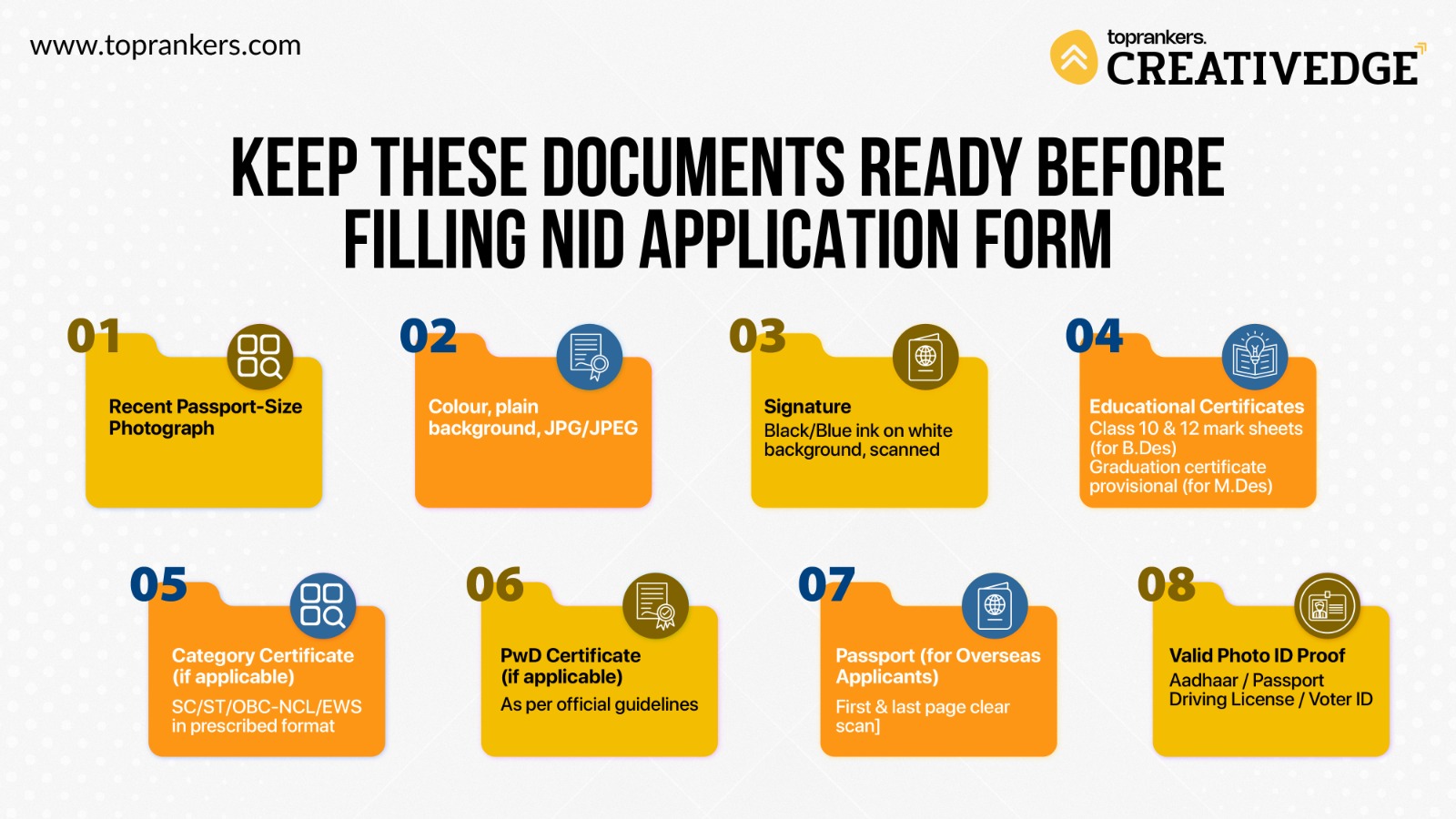
Step 4: Upload Documents
Uploading documents correctly is one of the most critical steps of filling NID application form 2027. Here are the common requirements (based on past years) and specifications for each you must check:
| Document | Format | Size | Key Requirements |
|---|---|---|---|
| Passport-size photograph | JPG / JPEG | ~50-200 KB | Recent, colour, white background, studio-taken; face fills ~80% of the frame; forehead, eyes, nose, cheeks, lips and chin clearly visible; no shadows or head cover. |
| Signature | JPG / JPEG | ~50-200 KB | Signed in black ink on white paper and scanned (not a phone photo). |
| Category certificate (SC/ST/OBC-NCL/EWS) | Up to 1 MB | Issued by the competent State authority (DM/Deputy Commissioner/SDM/Tehsildar); recent and valid. | |
| Disability certificate / UDID (PwD) | Up to 1 MB | Per RPwD Act 2016; UDID via swavlambancard.gov.in. | |
| Passport (overseas) | JPG / JPEG | Up to 1 MB | First and last page, clearly legible. |
Exact KB limits are set in the official 2027 handbook - verify before uploading.
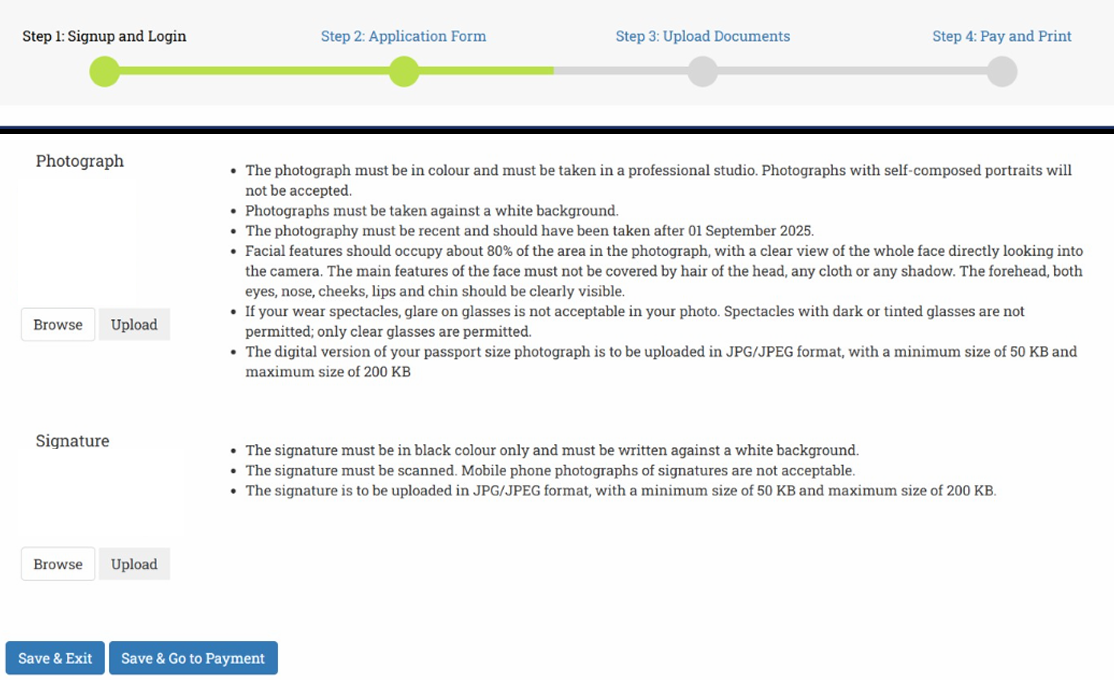
Checklist of documents to be uploaded by candidates under reserved category at the time of NID registration 2027 are summarized as under:
|
Applicants |
Photo |
Signature |
Certificate |
Valid documents to be submitted |
|
General |
Yes |
Yes |
No |
--- |
|
General EWS |
Yes |
Yes |
Yes |
EWS Certificate |
|
OBC-NCL |
Yes |
Yes |
Yes |
OBC-NCL Certificate |
|
SC |
Yes |
Yes |
Yes |
Caste Certificate |
|
ST |
Yes |
Yes |
Yes |
Tribe Certificate |
|
General-PwD |
Yes |
Yes |
Yes |
Disability Certificate and/or UDID Card* |
|
GEN-EWS-PwD |
Yes |
Yes |
Yes |
EWS Certificate |
|
Disability Certificate and/or UDID Card * |
||||
|
OBC-NCL-PwD |
Yes |
Yes |
Yes |
OBC-NCL Certificate |
|
Disability Certificate and/or UDID Card * |
||||
|
SC-PwD |
Yes |
Yes |
Yes |
Caste Certificate |
|
Disability Certificate and/or UDID Card * |
||||
|
ST-PwD |
Yes |
Yes |
Yes |
Tribe Certificate |
|
Disability Certificate and/or UDID Card * |
||||
|
Overseas |
Yes |
Yes |
No |
First page of Passport |
|
Last page of Passport |
||||
|
OCI/PIO Card, if opted in the application form |
*If a PwD candidate is using the facility of the scribe or compensatory time, they have to select relevant options, while filling the online application form and upload a valid Disability Certificate and/or UDID card.
Tips:
- Scan at 200-300 DPI- sharp enough that every line of the certificate is readable, small enough to stay under NID's file-size cap. If your scan is over the limit, compress the JPG rather than shrinking the image.
- Check color vs black-white requirements. Usually color is allowed.
- Ensure the certificate is from the proper authority and has date & sign.
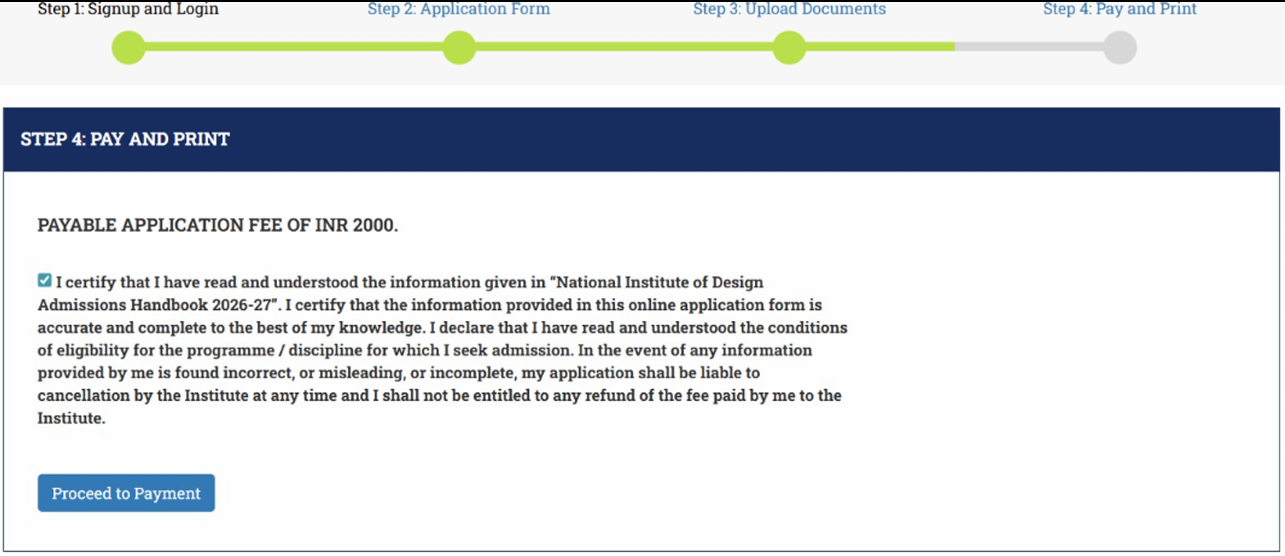
Step 5: Payment of Application Fee
1. After filling in all required fields in the NID 2027 application form and uploading docs, go to Payment section.
2. Choose payment method: usually online (credit card, debit card, net-banking, UPI). Sometimes for overseas, other options.
3. Fee varies by program:
(B.Des / M.Des), number of disciplines (in PG), and by category (General / OBC-NCL / SC / ST / PwD). Always check the latest fee schedule in the NID Admissions Handbook.

Mistakes to avoid in this step:
- Make sure you select correct category while paying; mismatch may result in incorrect NID 2027 fee or rejection.
- Keep transaction reference / fee receipt - download or screenshot.
- Don’t wait till last hour; payment gateway issues often happen in peak times.
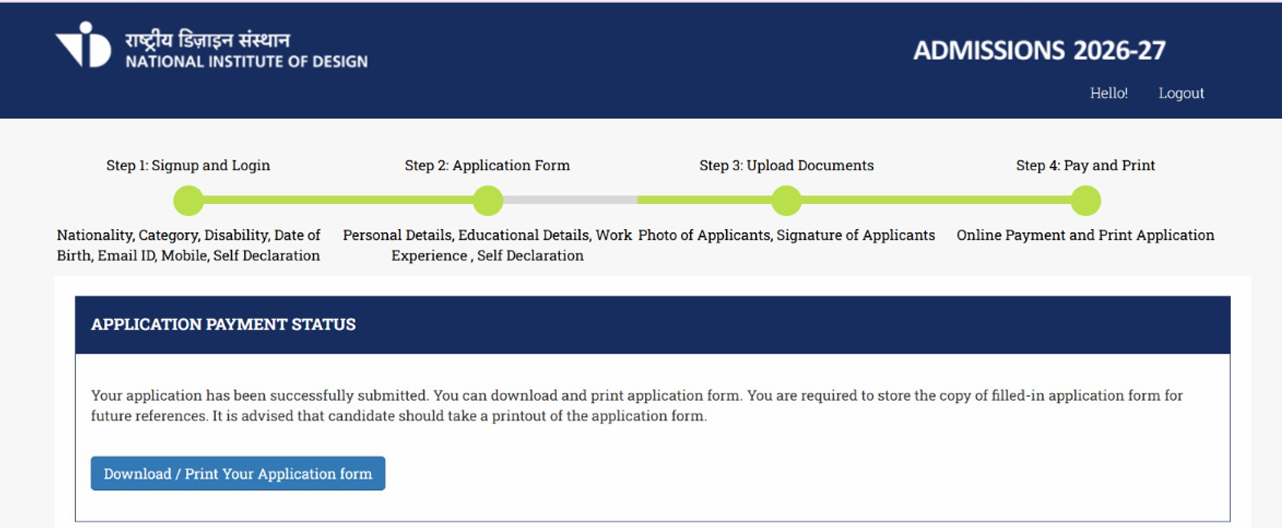
Step 6: Review, Submit & Print Confirmation
1. Before hitting “Submit,” go through every field once again- personal details, educational info, document uploads.
2. Correct any errors in spelling, marks, date, category, etc.
3. Submit the NID form. After submission, you’ll usually get a confirmation page or email. Download / print that confirmation.
4. Similarly, print or save the payment receipt / acknowledgement.
Step 7: Download Admit Card / Hall Ticket
1. After your application is accepted and verified, NID will release the admit card / hall ticket 7 to 10 days before the 2027 exam date.
2. Download it from the admissions portal using your login credentials.
3. Check that your photograph, printed name, exam centre, exam date etc. are correct on the admit card. If there is any mismatch, contact NID helpline immediately.
NID Application Form 2027 Fees
The NID application fee is the same across programs for a single application: ₹3,000 for General, GEN-EWS, and OBC-NCL candidates, ₹2,000 for female candidates (except SC/ST/PwD), ₹1,500 for SC/ST, and ₹500 for PwD and Third Gender candidates.
For the independent 2.5-year M.Des at NID Ahmedabad, the fee is charged per discipline - so it doubles if you apply for two disciplines and triples for three. Applying to M.Des at more than one NID requires a separate form and separate fee for each.
You can pay the NID form fee online only, using a debit card, credit card, or net banking. Here are the category-wise NID form fees for 2027-28:
|
Category |
Fee (per application; M.Des = per discipline) |
|
General / GEN-EWS / OBC-NCL |
₹3,000 |
|
Female (except SC/ST/PwD) |
₹2,000 |
|
SC / ST |
₹1,500 |
|
PwD |
₹500 |
|
Third Gender |
₹500 |
|
Overseas (Supernumerary) |
US$125 |
You can pay the NID form fees only online using either a debit or credit card. Here are the details of category-wise NID form fees 2027.
NID DAT Exam Cities You Can Choose in the Application Form
During NID registration 2027, you select a preferred DAT Prelims city. As per the official 2027-28 handbook, the DAT Prelims will be held across 17 cities - Ahmedabad, Bengaluru, Bhopal, Bhubaneswar, Chandigarh, Chennai, Dehradun, Hyderabad, Jaipur, Jorhat, Kochi, Kolkata, Lucknow, Mumbai, Nagpur, New Delhi, and Patna.
A city may have more than one test centre, and NID allots the centre by availability - so pick a city you can reach comfortably. Your chosen centre can only be changed during the edit window (1-3 December 2026); no change is allowed after that.
NID 2027 Application Form: Final Checklist
After filling in all your details, submitting required documents and paying the NID application fee, the next step is to submit the form, download the NID registration 2027 confirmation and save it's copy. You may also email it to yourself just in case, so that there remains no chance of misplacing it. This may seem minor but it's a very important step. We also suggest that before clicking the 'Submit' button, you double check the following details:
- Spelling of your name
- Educational Details
- Exam centre and course you chose
- Uploaded images + documents
After submission, also take physical printouts of the confirmation page for record, as you might need it during admit card download, studio test/interview round, or final admission & verification round.
Next, save your login credentials and application number safe. This might be required throughout the admission process.
Common Mistakes to Avoid While Filling NID Application Form 2027
|
Mistake |
Consequence |
How to Avoid |
|
Wrong name / inequality with certificates |
Rejection or inability to verify identity |
Use exact spelling as per 10th / 12th certificate; cross-check before submit |
|
Blurred or improperly scanned documents |
Upload gets rejected; delays |
Use a good scanner / camera; preview the file; ensure readability |
|
Exceeding file size or wrong format |
Upload fails |
Read specs in handbook; compress or convert file properly |
|
Wrong programme or discipline selected |
You may not be considered for your intended stream |
Read course descriptions; double check choice before submitting |
|
Missing last date / waiting for extension |
Miss application window |
Note deadlines; apply a few days before due date |
|
Payment failures or delays in gateway |
Application not complete; may lose seat |
Use stable internet; do payment in off-peak hours; screenshot proof |
NID Eligibility Criteria 2027
Before filling the NID B.Des / M.Des application form, check whether you meet the eligibility conditions:
For B.Des:
1. Must have passed or be appearing in 12th (10+2) in any stream from a recognized board.
2. Age:
|
Candidate’s Category |
Age Eligibility Criteria |
|
General / General EWS /Overseas candidates |
born on or after 1 July 2006 |
|
SC/ST/OBC-NCL |
born on or after 1 July 2003 |
|
PwD |
born on or after 1 July 2001 |
For M.Des:
1. Must have a bachelor’s degree in any discipline or be in the final year.
2. Age:
|
Candidate’s Category |
Age Eligibility Criteria |
|
General / General EWS /Overseas candidates |
born on or after 1 July 1995 |
|
SC/ST/OBC-NCL |
born on or after 1 July 1992 |
|
PwD |
born on or after 1 July 1990 |
Failing eligibility checks can lead to rejection even after successful NID registration 2027.
Key Takeaways
- Navigating how to apply for the NID entrance exam 2027 requires meticulous planning and attention to detail.
- The NID application form for 2027 entrance exam will be released online and is expected to start in October 2026.
- By understanding the key requirements for NID 2027 registration, preparing necessary documents, and adhering to deadlines, applicants can increase their chances of securing a coveted spot at NID.
- Remember, a well-crafted application is your first impression, so invest time presenting your best self and ensure timely payment of the NID form fee.
Now that you've understood the entire all the NID DAT 2027 registration details, here's the direct link to NID 2027 registration: NID 2027 Registration Link! You can click on it and fill the form as soon as it's released.
Still unsure about anything related to the NID form-filling process? Or need expert's help filling out your NID application? Our team of counsellors help several students each year. Reach out to us @6363286363

Attempt a Free NID Mock Test
Fill your details
Frequently Asked Questions
Is the NID application form 2027 out?

What is the last date to fill the NID registration form 2027?
What documents are required for NID DAT registration 2027?
Can I change my date of birth in NID Application form correction window?
Can I apply for both B.Des/Integrated and the independent M.Des in one form?
What is the last date to fill the NID registration form 2027?

Vineeta Agrawal
Communications Executive
SHARE